
How to use state machines generated by Sinelabore with STM CubeMX#
This example shows how easy it is to add state machines to STM32 CubeMX projects.
This example was created for the STM32F103C8T, for which inexpensive evaluation boards are widely available.
The graphic shows the typical development flow for a CubeMX project and where the Sinelabore State Machine Generator comes into play.
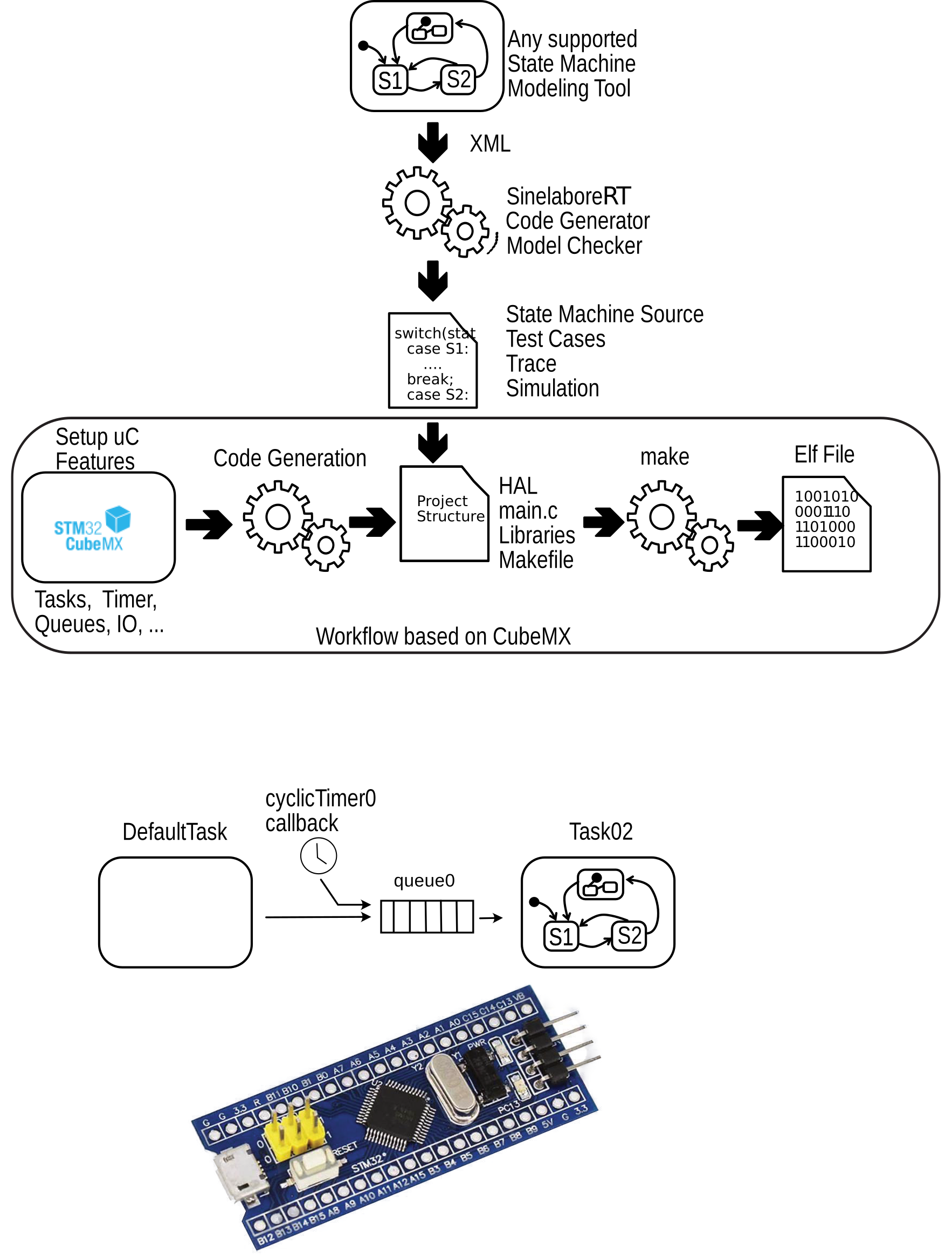
In this example, the CMSIS RTOS API is used with two tasks, a message queue, and a timer. The state machine runs in Task02 and receives events from the timer callback function cyclicTimer0Callback, as well as from the default task. The state machine itself is intentionally simple and generates a blinking pattern that is terminated after some time by a FailSafe event.
The state machine was created with the integrated State Diagram Editor. To modify the machine, start the editor, load the model, and regenerate the code after your changes.
Follow the steps below to recreate this example. This guide assumes that you have already installed the GNU Arm toolchain and a debug interface. Links to the required tools are listed below.
- Download the demo project zip and unzip it.
- Create a project folder.
- Copy the project file into your project folder and open it in CubeMX.
- Generate the complete project code into that project folder.
- Replace the generated Makefile with the modified Makefile provided in the demo project folder. The modified Makefile contains the state machine C/H path.
- Finally, replace
main.cin theCore/Srcfolder with the demo version. It contains the application logic for the two tasks.
Now run make and flash the generated ELF file to the board using your debugger.
In one console, run the debug stub:
/opt/homebrew/bin/st-util
In another console, run the debugger:
/Applications/ARM/bin/arm-none-eabi-gdbtarget remote 192.168.6.191:4242load build/example.elffile build/example.elfcThe Arm tools and CubeMX make it very easy to get started with the STM32 microcontroller family, and the Sinelabore State Machine Generator completes this toolchain very well.
Links#
- Required project files: stm_tutorial.zip
- Blue Pill Development Board: https://stm32-base.org/boards/STM32F103C8T6-Blue-Pill.html
- Documentation for the STM32CubeIDE ST-LINK GDB server: https://www.st.com/resource/en/user_manual/um2576-stm32cubeide-stlink-gdb-server-stmicroelectronics.pdf
- CMSIS-RTOS2 documentation: https://www.keil.com/pack/doc/CMSIS/RTOS2/html/genRTOS2IF.html
- Arm GNU Toolchain Downloads: https://developer.arm.com/downloads/-/arm-gnu-toolchain-downloads
- Open source version of the STMicroelectronics STLINK Tools: https://github.com/stlink-org/stlink