
Learn Tips and Tricks how to use the Code Generator in a best way for your System Setup – Using State-Machines in (Low-Power) Embedded Systems#
New: For a structured overview of architecture, code generation, and UML modeling patterns see the Design Patterns for Code Generation guide.
Reactive systems are characterized by a continuous interaction with their environment. They typically continuously receive inputs (events) from their environment and − usually within quite a short delay − react on these inputs.
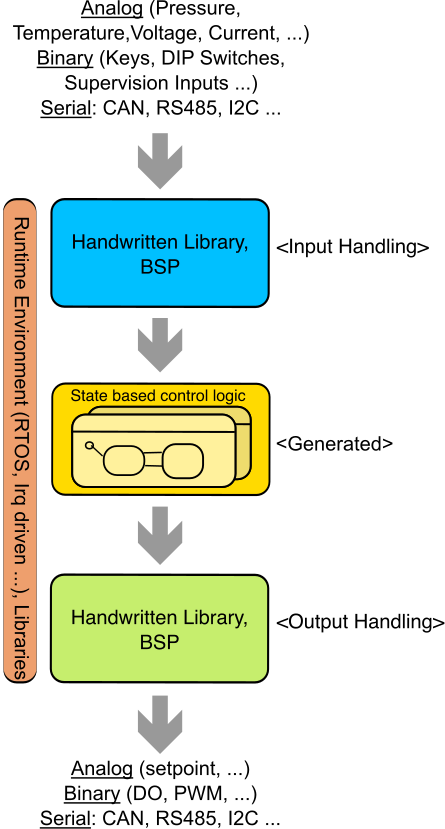
Most embedded systems use a layered architecture: an input layer receives data and signals from sources such as analog or digital inputs and communication networks, while a processing layer transforms these inputs into outputs using state-based control logic, processing rules, or signal-processing algorithms.
The reactive control part can be very well described with the help of state machines. State machines allow to develop an application in an iterative way. States in the state diagram often correspond to states in the application. The resulting model helps to manage the complexity of the application and to discuss it with colleagues from other departments (and domains). Details can be added step by step during the development. Even during creation, the Code Generator can check the state diagrams for consistency (Model Check). Its logic can be simulated and tested. This ensures that the state machine behaves as intended.
State machines are very useful for control-oriented applications where attributes such as reliability, code size, power consumption, and real-time behavior are particularly important.
Architecture Alternatives#
There are different ways how to integrate state machines in a specific system design. Some design principles are more applicable for developers of deeply embedded systems. Others more relevant for developers having not so tight resource constraints.
The SinelaboreRT code generator supports you in the creation of the state based control logic. Generated code fits well in different system designs. The code generator does not dictate how you design your system. Therefore it is no problem to use the generated code in the context of a real-time operating system or within an interrupt service routine or in a foreground / background system.
Using state machines in a main-loop#
In this design an endless loop — typically the main function — calls one or more state machines after each other.
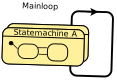
It is still one of the most common ways of designing small embedded systems. The event information processed from the state machines might come from global or local variables fed from other code or IRQ handlers. The benefits of this design are no need for a runtime framework and only little RAM requirements.
The consequences are:
- All housekeeping code has to be provided by the designer
- Main loop must be fast enough for the overall required response time
- In case of extensions the timing must be carefully rechecked again
Example:
void main(void){
  …
  sm_A();
  sm_B();
  …
}
Using state machines in a main loop with event queue#
This design is like the one presented above. But the state machine receives its events from an event queue. The queue is filled from timer events, other state machines (cooperating machines) or interrupt handlers.
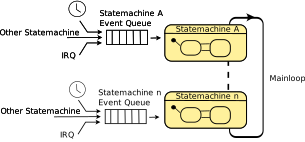
Benefits:
- Events are not lost (queuing)
- Event order is preserved
- Decoupling of event processing from event generation.
Consequences
- A minimal runtime framework is required: Timers and Queues
- Main loop must be fast enough for the overall required response time
This architecture requires timers and queues. The intended usage is as follows:
- Each state machine has an own event queue
- Eventually a state machine requires one or more timers (single shot or cyclically).
- A state machine can create as many timers as needed. When creating a timer the event queue of the state machine and the timeout event has to be provided. For different timers it makes sense to provide different timeout events.
- To make the timer work, a tick counter variable has to be incremented cyclically from a timer interrupt (e.g., every 10 ms). The tick frequency should be selected based on the minimal required resolution of the timeout times.
- A tick() function must be called in the main loop to check if any timer has expired. In case a timeout has happened the provided event is stored in the event queue of the state machine.
- The main loop has to check if events are stored for a state machine in its queue. If there are new events they are pulled from the queue and the state machine is called with the event.
Example code with two state machines shows the general principle#
// tick irq
void tick(void){
  pulseCnt++;
}


void main(void){
  ….

  // create two queues for two state machines and init the timer subsystem
  fifoInit(&fifo2VendingMachine, fifo2VendingMachineRawMem, 8);
  fifoInit(&fifo2ProductStoreMachine, fifo2ProductStoreMachineRawMem, 8);
  timerInit();

  …

  while (1) {
    uint8_t evt;
    //
    // Check if there are new events for the state machine. If yes,
    // call state machine with event.
    //
    bool fifoEmpty = fifoIsEmpty(&fifo2VendingMachine);
    if (!fifoEmpty) {
      fifoGet(&fifo2VendingMachine, &evt);
      vending_machine(&vendingMachine, evt);
    }

    fifoEmpty = fifoIsEmpty(&fifo2ProductStoreMachine);
    if (!fifoEmpty) {
      fifoGet(&fifo2ProductStoreMachine, &evt);
      product_store_sm(&productStoreMachine, evt);
    }

   // any new timeouts?
   tick();
  }
As indicated in the figure above also other state machines or interrupt handlers might push events to the queue of a state machine. An example how to do this is shown below.
// add event evErr to a state machine queue.
void ISR_Btn1() {
  fifoPut(&fifo2VendingMachine, evErr);
}
Using state machines in a main loop with event queue, optimized for low power consumption#
In low power system designs a key design goal is to keep the processor as long as possible in low power mode and only wake it up if something needs to be processed. The design is very similar to the one described above. The main difference is that the main loop runs not all time but only in case an event has happened. The timer service for the small runtime framework is handled in the timer interrupt.
A skeleton for the MSP430 looks as follows#
void main(void){

  // init system

  while(1) {

    // check event queues and run the state machine as shown above

     …
     __bis_SR_register(LPM3_bits + GIE);  // Enter low power mode once
     __no_operation();                    // no more events to process
   }
}

// Timer A0 interrupt service routine. If the timer
// function tick() returns true there
// is a timeout and we wakeup the main loop.
#pragma vector=TIMER0_A0_VECTOR
__interrupt void Timer_A0(void)
{
  bool retVal=false;

  P1OUT |= BIT0; // toggle for debugging

  retVal = tick();

  if(retVal){
    // at least one timeout timer fired.
    // wake up main loop
    bic_SR_register_on_exit(LPM3_bits);
  }
  P1OUT &= ~BIT0; // toggle for debugging
  // no more events must be processed
}
The following temperature transmitter using a MSP430F1232 header board with just 256 bytes of RAM and 8K of program memory is based on this design principle.

For more information on how to use state-machines in low-power embedded systems see here and here.
Using state machines in interrupts#
Sometimes state dependent interrupt handling is required. Then it is useful to embed the state machine directly into the interrupt handler to save every us. Typical usage might be the pre-processing of characters received by a serial interface. Or state dependent filtering of an analog signal before further processing takes place.

Using state machines in an interrupt handler can be useful in any system design.
For code generation some considerations are necessary. Usually it is necessary to decorate interrupt handlers with compiler specific keywords or vector information , etc. Furthermore interrupt service handlers have no parameters and no return value. To meet these requirements the Sinelabore code generator offers the parameters StateMachineFunctionPrefixHeader, StateMachineFunctionPrefixCFile and HsmFunctionWithInstanceParameters.
The example below shows an interrupt service routine with the compiler specific extensions as required by mspgcc#
// generated state machine code for an irq

interrupt (INTERRUPT_VECTOR) IntServiceRoutine(void)
{
   /* generated statemachine code goes here */
}
To generate this code, set the key/value pairs in your configuration file the following way:
StateMachineFunctionPrefixCFile=interrupt (INTERRUPT_VECTOR)
HsmFunctionWithInstanceParameters=no
If the prefix of the interrupt service routine requires to span more than one line the line break ’\n’ character can be inserted as shown below:
StateMachineFunctionPrefixCFile=#pragma vector=UART0TX_VECTOR\n__interrupt voidPrefixes for the header and the C file can be specified separately.
Using state machines with a real-time operating system#
In this design each state machine usually runs in the context of an own task. The principle design is shown in the following figure.
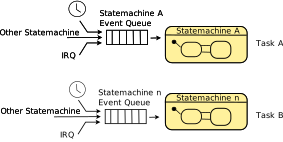
Each task executes a state machine (often called active object) in an endless while loop. The tasks wait for new events to be processed from the state machine. In case no event is present the task is set in idle mode from the RTOS. In case one or more new events are available the RTOS wakes up the task. The used RTOS mechanism for event signaling can be different. But often a message queue is used. Events might be stored in the event queue from various sources. E.g. from within another task or from inside an interrupt service routine. This design can be realized with every real-time operating system. Only the event transport mechanisms might differ.
Benefits:
- Efficient and well tested runtime environment provided from the real-time operating system
- Prioritization of tasks, scheduling available
- State machine processing times decoupled from each other.
Consequences:
- Need of a real-time operating system (complexity, ram usage, cost …)
In the how-to section an example of this pattern is presented with FreeRTOS. The examples below show code for RTEMS and embOS.
// rtems specific task body
rtems_task oven_task(rtems_task_argument unused)
{
  OVEN_INSTANCEDATA_T inst = OVEN_INSTANCEDATA_INIT;

  for ( ; ; ) {
    // returns if one event was processed
    oven(&inst);
  }
}


// generated state machine code
extern rtems_id Queue_id;
uint8_t msg=NO_MSG;
size_t received;
rtems_status_code status;

void   oven(OVEN_INSTANCEDATA_T *instanceVar) {

  OVEN_EV_CONSUMED_FLAG_T evConsumed = 0U;


  /*execute entry code of default state once to init machine */
  if (instanceVar->superEntry == 1U) {
    ovenOff();

    instanceVar->superEntry = 0U;
  }

  /* action code */
  /* wait for message */
  status = rtems_message_queue_receive(
             Queue_id,
             (void *) &msg,
             &received,
             RTEMS_DEFAULT_OPTIONS,
             RTEMS_NO_TIMEOUT
           );
  if ( status != RTEMS_SUCCESSFUL )
    error_handler();
  }else{
    switch (instanceVar->stateVar) {
      // generated state handling code
     …
    }
  }
}// state machine instance
SM_INSTANCEDATA_T instanceVar = SM_INSTANCEDATA_INIT;
// Task and queue objects.
static OS_STACKPTR int Stack_TASK_1[128]; /* Task stacks */
static OS_TASK TCB_TASK_1; /* Task-control-blocks */
static OS_Q MyQueue;
static char MyQBuffer[100];
OS_TIMER MyTimer;
char txbuf[32] ;
// Routine called from the embOS RTOS to signal
// a timeout. A timeout event is sent to the state
// machine. Multiple timer callback functions might be created if
// several timers are needed at the same time. Each one then fires an own
// event. E.g. ev50ms or ev100ms
static void MyTimerCallback(void) {
uint8_t msg=evtTimeout;
OS_Q_Put(&MyQueue, &msg, 1);
}
// Task blocked until a new event is present. The new event is
// then sent to the state machine.
static void TaskRunningStateMachine(void) {
char* pData;
while (1) {
// waiting for new event
volatile int Len = OS_Q_GetPtr(&MyQueue, (void**)&pData);
volatile char msg = *pData;
sm(&instanceVar, (SM_EVENT_T)msg); // call generated state machine with event
OS_Q_Purge(&MyQueue);
}
}Events versus Boolean Conditions#
Sinelabore supports two basic modes of operation. Either the generated state machines react on events. Only if an event is present a transition is taken (e.g. evDoorClosed, evButtonPressed). Events are eventually send to the state machine using an event queue (see above). Alternatively transitions are triggered by boolean conditions. If a boolean condition is true a state change happens (e.g. DI0==true). The latter one is useful if binary signals should be processed like shown in these two designs.
In this cases the state machine runs without receiving a dedicated event. Based on the current state, conditions derived from boolean signals are used to trigger state transitions.