
Generating C++ Code#
Sinelabore supports C++ code generation. By default, the code generator uses only a subset of C++ to account for resource-constrained systems. In fact, only classes, public/protected/private member variables and methods are used. For more powerful systems, code generation using features of C++11 is supported if enabled (–std=c++11 for g++ or clang++). The various parameters allow you to customise the generated code to suit your needs. The quality of the generated code has been proven in practice by my many demanding customers using various lint-like tools without any problems.
To generate C++ code call the code generator with the command line flag -l cppx.
The generated code does not follow the state pattern as you might expect (if you are familiar with common design patterns). The reason is that the machine code is completely generated and no hand-coding is involved. The following class diagram shows the structure of the generated classes.
The code generator supports code generation from models with regions and all other relevant state machine features. An example of a simplified microwave oven model is shown below. Regions allow the expression of parallelism within a state. A state may have two or more regions. A region contains states and transitions. Imagine how much effort it would be to write the code for this machine by hand. And even worse, how difficult it would be to maintain it over time as new states/events are added.
The signature of the event handler can be adapted to your own needs in a flexible way:
Basic signature:
int processEvent(const TESTCASE_EVENT_T msg);Using a template parameter that allows elegant and flexible parameter passing:
template <typename T>
int processEvent(const TESTCASE_EVENT_T msg, const T& userdata);
Without any parameter:
int processEvent(void);Command-line parameter -Trace enables trace code generation.
All details about the C++ backend are available in section “Generating C++ Code” of the manual.
Model Example and Generating Code#
Assume that C++11 features are to be used to generate the code for the oven example shown. The following parameters have been set in the configuration file according to the requirements.
UseEnumBaseTypes = YES
EnumBaseTypeForEvents = std::uint16_t
EnumBaseTypeForStates = std::uint32_t
ReturnAndProcessEventTypeOfStateMachine = std::uint16_t
InitializedFlagTypeOfStateMachine = std::uint16_t
VisibilityInitializedVar = private:
VisibilityStateVars = private:
CallInitializeInCtor = yes
NotUseRedundantVoidArgument=YES
EnableTrailingReturnType=YES
UseStdLibrary = YES
The usual example state diagram modeling a hierarchical microwave oven is shown below. Imagine the effort to manually write the code for this machine. And even worse how difficult it would be to maintain it over time when new states/events are added.
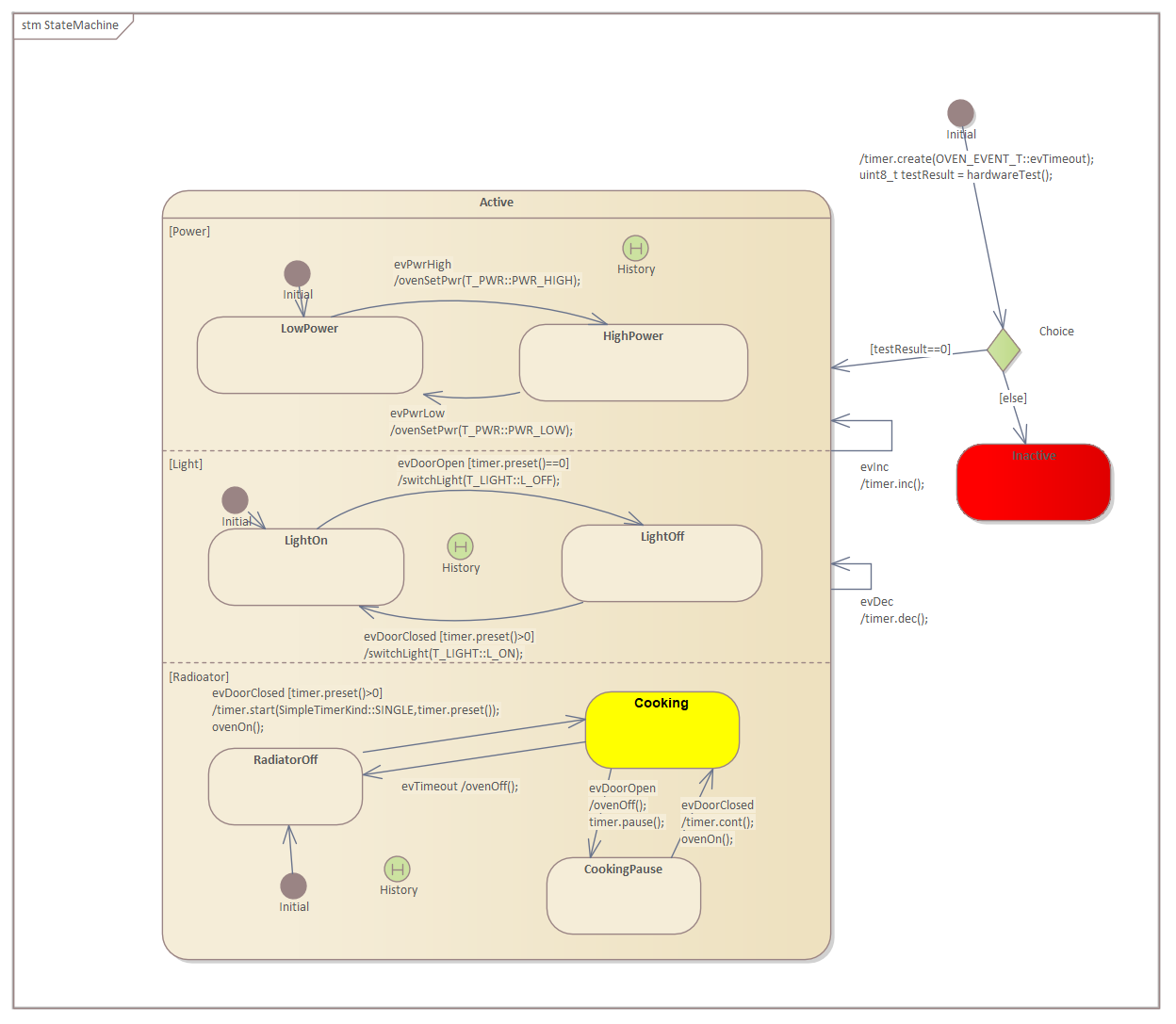
The complete code is available in the examples folder on our GitHub site.
The generated code does not rely on any library. It can be easily integrated into different system designs. An example is shown below. In this case, the state machine runs in a separate thread and receives events via an event queue. This is a typical usage pattern in embedded real-time systems.
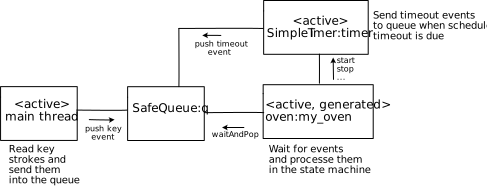
See how easy it is to integrate the generated state machine code into an RTOS task. Depending on the RTOS, the framework code will always look a bit different.
std::thread eventHandlerThread() {
  my_oven* machine = new my_oven();
  machine->initialize();
  while (true) {
    OVEN_EVENT_T msg;
    q.waitAndPop(msg);
    machine->processEvent(msg);
  }
}Summary#
The C++ backend has proven itself with many users and guarantees consistently high code quality through the generator. You can fully concentrate on the respective application. Download the demo and try out the microwave_ea9_using_regions_cpp11 example.