
UML State Machine Code Generation#
Features of the Sinelabore state machine code generator#
State machines show the dynamic behavior of an application. It is a graph of states and transitions that describes how the system responds to events in each state. State machines have been used for decades in hardware design, and in recent years they have become increasingly common in software development. In the embedded real-time domain in particular, statecharts are popular because the behavior of applications and devices can often be modeled effectively with them. D. Harel’s paper “Statecharts: A Visual Formalism for Complex Systems” (1987) remains essential reading.
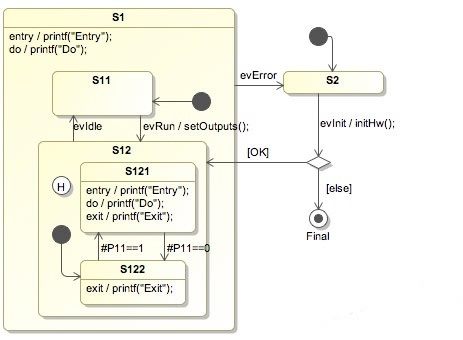
The left figure shows a hierarchical state diagram with several typical design elements: states and child states (hierarchy), history when re-entering a composite state, action code on entry and exit of a state, an initial state marking the start, and a final state marking the end.
An important aspect of state diagrams is that the design can be directly transformed into executable code. This means that there is no break between the design and the implementation. This is all the more important if the device under development has to be developed, for example, according to IEC 61508. Please note that the code generator itself is not certified in any way. It is your responsibility to verify and validate that the generated code fulfills your needs.
SinelaboreRT was built especially for embedded real-time developers. It focuses on just one task: code generation from state diagrams. A command-line tool and a configuration file are all that is needed.
The generated code is based on nested switch/case and if/then/else statements. It is easy to read and understand. The generated code will not create any headache when using static code analyzers.
SinelaboreRT does not dictate how you design your system. Therefore it is no problem to use the generated code in the context of a real-time operating system, within an interrupt service routine, or in a foreground/background system. The generation process can be influenced to meet specific needs.
How does SinelaboreRT work? From a state chart design file created with the Cadifra UML editor, Enterprise Architect, UModel, or MagicDraw, the code generator produces the complete state machine implementation. For an example design file called oven.cdd, the command line is for Linux/Mac/…:
java -cp "pathToCodegenJarFolder/*" codegen.Main -p CADIFRA -o oven oven.cddFor Windows:
c:\jdk-17\bin\java.exe -cp “c:/sinelaboreRT7.1/bin/*” codegen.Main -p CADIFRA -o oven oven.cddAs a result, the following files are generated:
oven.cimplements the state machine as graphically specified in theoven.cdd(model) fileoven_ext.hdefines the events that can be sent to the state machineoven_dbg.hdefines functions to support you during debuggingoven.hdefines the interface of the state machine
These files implement the complete state machine. They are clearly readable target-language code and can be understood and verified by any C/C++ programmer as example.
Supported State Diagram Design Elements#
Hierarchical state definition: State machines can be hierarchical or flat. A state with substates is called a hierarchical state machine. States can have entry code that is always executed when a state is entered. Exit code is executed whenever the state is left. A state can also have action code. The action code is executed whenever the state is active, just before event transitions are evaluated.
Regions: Regions let you model parallel behavior within the same state machine diagram. The benefit of using regions is that they explicitly show this parallel behavior instead of forcing you to create separate state diagrams.
Transitions: There are two types of transitions: (a) event-based ones and (b) conditional ones. Event-based transitions are triggers coming from outside the state machine. An event-based transition has the following syntax:
eventName[guardExpression]/action.
A conditional (or when) transition is not triggered by an event but by a C expression that evaluates to true (for example, a port pin set). It has the syntax:
#condition/action.
Choices: The OMG UML specification states: …choice vertices which, when reached, result in the dynamic evaluation of the guards of the triggers of its outgoing transitions. This realizes a dynamic conditional branch. It enables splitting of transitions into multiple outgoing paths such that the decision on which path to take may be a function of the results of prior actions performed in the same run-to-completion step.
History States: When you leave a hierarchical state and enter it again, the default substate is usually selected. If the last active substate should be entered instead, a shallow history marker can be placed in the state. If you want history to apply to all substates of that state, use the deep history marker instead. Macros are provided to reset history when needed.
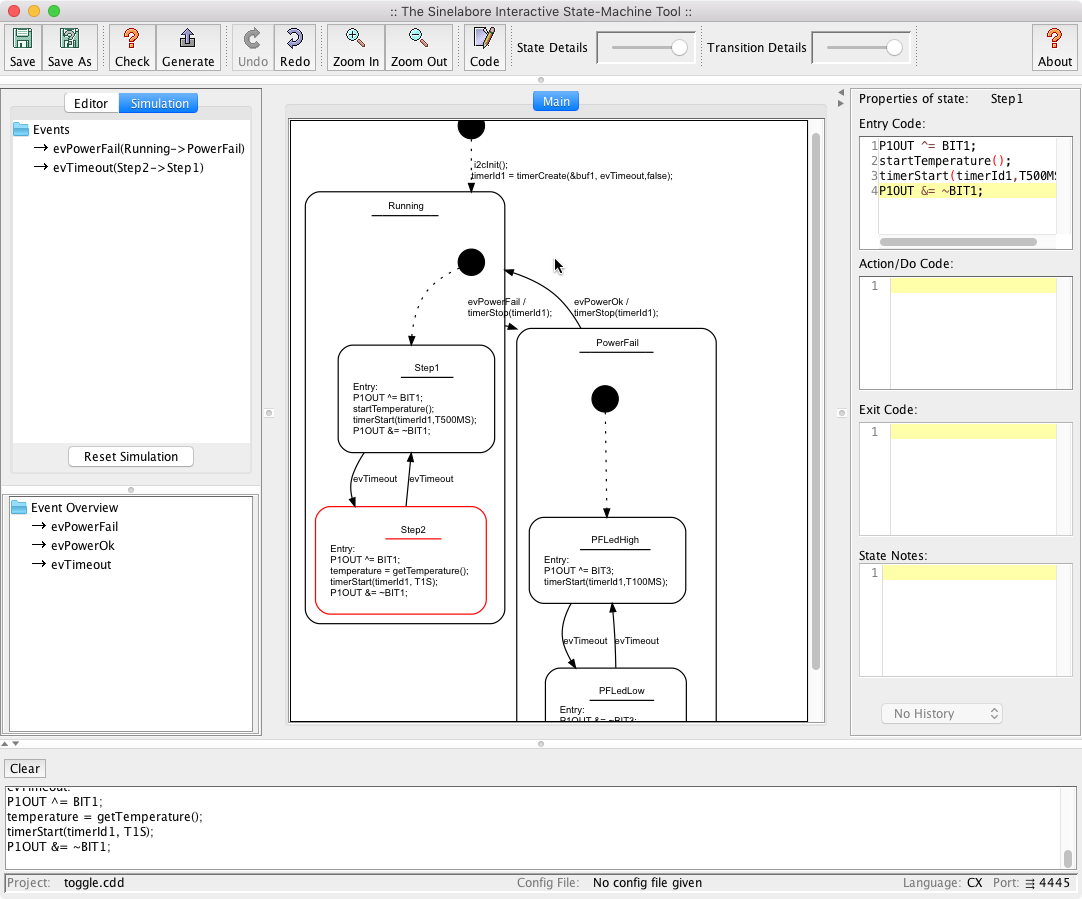
Interactive Test and Simulation: If the command-line flag -s (for simulation) is used, the code generator enters interactive mode after parsing the input file. No code is produced then. After parsing, you can type in events and observe the state machine’s reaction. During a simulation step, all code executed in response to an event is printed out (for example, the OnEntry code). When you use the command-line flag -S, the graphical simulation is started.
The red frame indicates the currently active state. In the ‘Event Overview’ window, events are listed that can be handled in this state are listed.
Secure, On-site Code Generation The code generator runs locally on your developer workstations, build servers or continuous integration servers. It does not use an internet connection and will never collect nor submit data, code, statistics, analytics, or any other information from your system over any channel.
Debugging / Trace Support: The *_dbg.h file provides two helper functions that are useful for debugging state machines. The function *_GetNameByState(id) returns the name of the state for a given id. The function *_GetNameByEvent(id) returns the name of the event for a given id. Trace statements can be added to the machine automatically. This makes it easier to follow the flow of events.
Integrated State-Diagram Editor: Using the command-line flag -E opens the integrated state diagram editor. It provides an efficient tree-based entry method. The graphical representation is created automatically, so you can focus on modeling. For Windows and macOS, executable files are also provided in addition to the JAR file; they launch the integrated editor directly.
⬇️Download the trial version and test the generator.