
How to use state machines with a real-time operating system#
State machines can be used in many parts of a system. In this example, you will learn how to use a state machine in the context of an RTOS (real-time operating system). For this exercise, the concrete RTOS does not matter much, because the overall approach is always the same. We use FreeRTOS here.
FreeRTOS is a widely used real-time operating system (RTOS) for microcontrollers and small microprocessors.
There is a Windows port layer which allows to quickly test how to use the state machine code generated by the SinelaboreRT code generator on your computer.
In this design pattern, state machines run in their own task context. The principle is shown in the following figure.
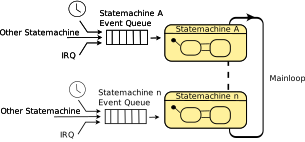
Each task executes a state machine (often called active object) in an endless while loop. The tasks wait for new events to be processed from the state machine. In case no event is present the task is set in idle mode from the RTOS. In case one or more new events are available the RTOS wakes up the task. The used RTOS mechanism for event signaling can be different. But often a message queue is used. Events might be stored in the event queue from various sources. E.g. from within another task or from inside an interrupt service routine from a timer which is shown in the code below. This design can be realised with every real-time operating system. Mainly the exact syntax differs from OS to OS.
Simple State Machine#
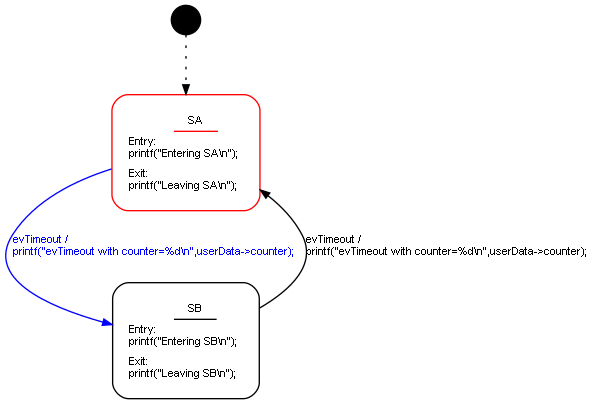
The simple state machine below reacts to a cyclic timer. It toggles between the two states SA and SB. It prints some text for demonstration when entering or leaving a state and when a transition takes place. In more complex systems, more than one timer might be needed. If different timers are needed, different timeout events and timers can be set up easily.
Setup the system#
This simple main function creates a task, a queue, and a timer, and then starts the RTOS scheduler.
int main( void ){
    prvInitialiseHeap();
    vTraceEnable( TRC_START );

    xTaskCreate(tA, "TA", 1000 /*Bytes stack*/, NULL /* no parameters */,
        tskIDLE_PRIORITY + 1, NULL);


    /* Create the queue. */
    queueHandle = xQueueCreate(32, sizeof(USER_EVENT_T));

    timerHandle = xTimerCreate("Timer",	/* name for debugging */
        1000,                           /* ticks -> 1s */
        true,                           /* true = repetitive */
        NULL,                           /* The timer's ID is not used. */
        timerCallback);                 /* The function executed when the timer expires. */

    xTimerStart(timerHandle, 0);        /* The scheduler has not started so use a block time of 0. */

    vTaskStartScheduler();
}
TA task#
The task waits (blocking) for elements to appear in the queue. If data is present in the queue, it is dequeued and passed to the state machine.
static void tA(void* xTimerHandle){
    /* Avoid compiler warnings resulting from the unused parameter. */
    (void)xTimerHandle;
    USER_EVENT_T data = { SM_NO_MSG , 0 };

    while(true){
        printf("TA task.\r\n");

        /* Wait until something arrives in the queue - this task will block
        indefinitely. */

        // call once to init
        sm(&instDataSM, &data);

        while (true) {
            xQueueReceive(queueHandle, &data, portMAX_DELAY);
            sm(&instDataSM, &data);
        }
    }
}Timer#
Each timer has a callback function that is called by the RTOS when a timeout occurs. In the timer handler, we simply enqueue a message with a timeout event (evTimeout). In this example, additional data is sent along with the event. Therefore, a custom data type (USER_EVENT_T) is used and sent to the state machine. Otherwise, it would also be possible to send only the event.
For clarity, it is useful to follow a naming convention for events. Here, the timeout event is called evTimeout. If you have multiple timers, name the events according to their purpose.
/* This is the software timer callback function. This
    callback function will execute if the timer expires */
void timerCallback(TimerHandle_t xTimerHandle){
    static uint8_t cnt = 0;
    cnt++;

    USER_EVENT_T data = {evTimeout, cnt}; // evTimeout is used in the state diagram

    xQueueSend(queueHandle, &data, 0U);
}Wrap-up#
This article showed how to use state machines in the context of FreeRTOS. The same pattern can also be used with other RTOS implementations. Using this pattern enables a flexible system design and helps build robust, easy-to-understand real-time embedded systems.
The relevant files are available here: freertos-code.zip